Mobile App Development
From idea to the App Store
iOS and Android apps designed around how your business actually runs — and games. We draw the screens, write the code, handle the store submission and maintain it after launch. Curious how we work? Our own app, CepSalon, has been live on the App Store since 21 August 2026.
CepSalon
Live on the App Store
- App StoreOur own app is live
- iPhone + WatchTwo devices, one project
- PushAPNs / FCM infrastructure
- End to endDesign, code, store, maintenance
What we do
What kind of apps do we build?
Business apps
Apps that put your business in a pocket
Scheduling & booking
Appointments, classes, tables, rooms or vehicles. Conflict checks, reminders and cancellation flows included.Field & operations
Order picking, dispatch, courier tracking, stock counts and barcode scanning. Keeps working offline and syncs when the connection returns.Customer loyalty
Digital membership cards, points, campaigns and coupons. Announce with a push instead of paying for SMS.Staff app
Shifts, attendance, leave requests, task lists and approval flows — approvals happen on the manager's phone.B2B ordering & catalog
Let dealers and wholesale customers browse and order from their phone, with stock and pricing coming from your system.Manager dashboard in your pocket
Revenue, stock, bookings and alerts on one screen; critical approvals without sitting down at a computer.Membership & content
Subscriptions, lessons and training content, announcements and messaging — all managed from a web panel.A mobile face for your current system
A thin app that talks to your existing software's API and carries over only the screens you need.
Games
Games whose feel is solved before the art
Casual & hyper-casual
Short-loop games learned with a single tap and played on the bus. Time-to-learn measured in seconds.Rhythm & music games
Judgement is derived from the audio clock, not the render loop, so music and visuals never drift apart. That is exactly the problem we solved in our own rhythm-game prototype.Puzzle & word
Level generation, difficulty curve and hint economy designed together, so one doesn't quietly break another.Reflex & score-driven
Leaderboards, daily goals, streaks and progress saving — the parts that actually bring a player back.Sound & haptics
Hit sounds, vibration feedback and music. A game's "feel" is mostly built here, not in the artwork.Advergames
A branded mini-game for a trade fair, campaign or event. Short, shareable, with a leaderboard.Level editor
So you can author content without touching code — new levels shouldn't require a new release.Release & rating
Age rating, ads and purchase model, store artwork and a promo video, all included.
To be clear: our scope is 2D and casual titles. We don't produce large-scale 3D (AAA) games — we'd rather draw the line up front than overpromise.
Case study · Our own app
CepSalon — live on the App Store
- Store
- App Store · Lifestyle
- Release date
- 21 August 2026
- Devices
- iPhone, iPad + Apple Watch
- Minimum OS
- iOS 17
- App size
- 11.8 MB
- Age rating
- 4+
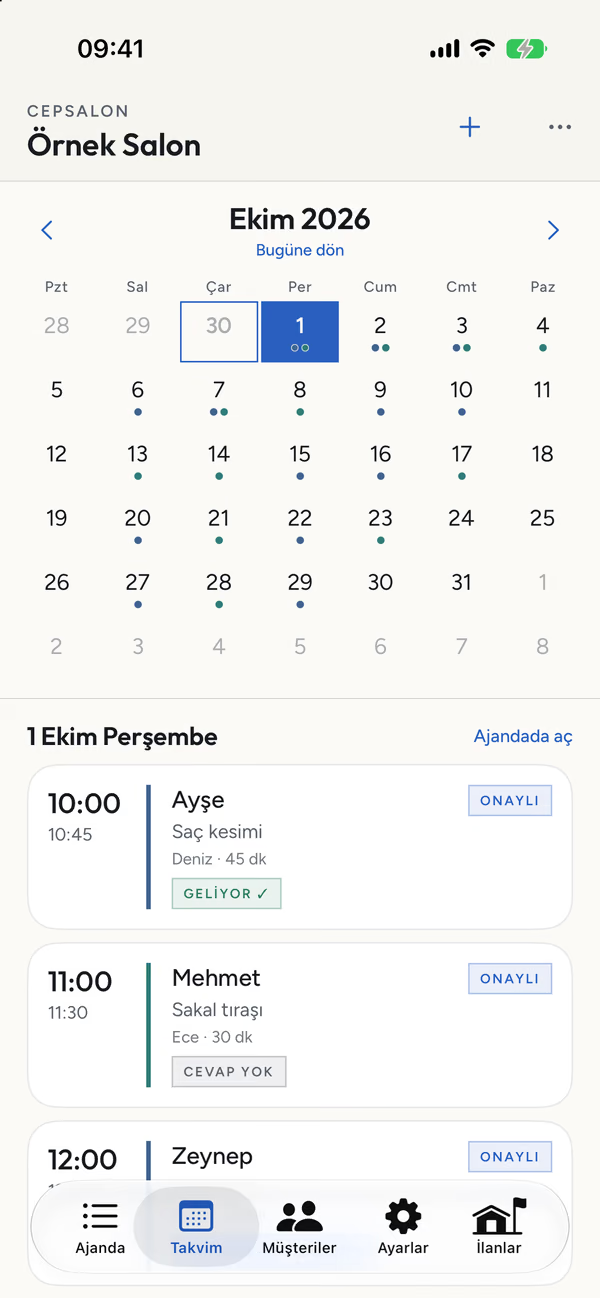
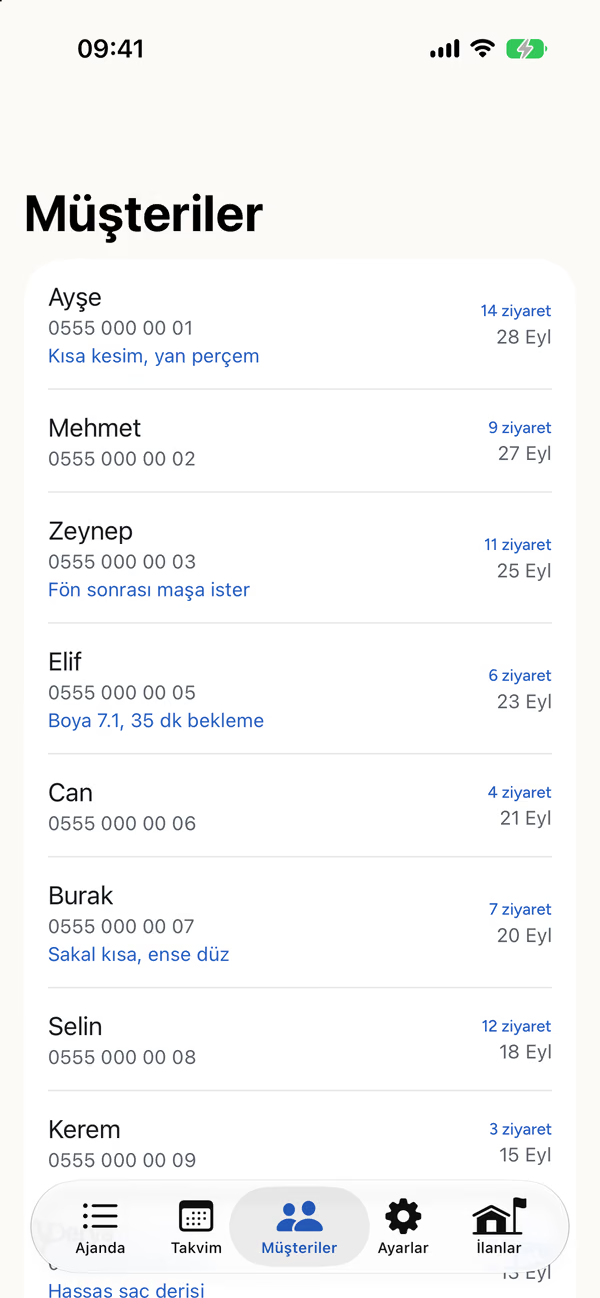
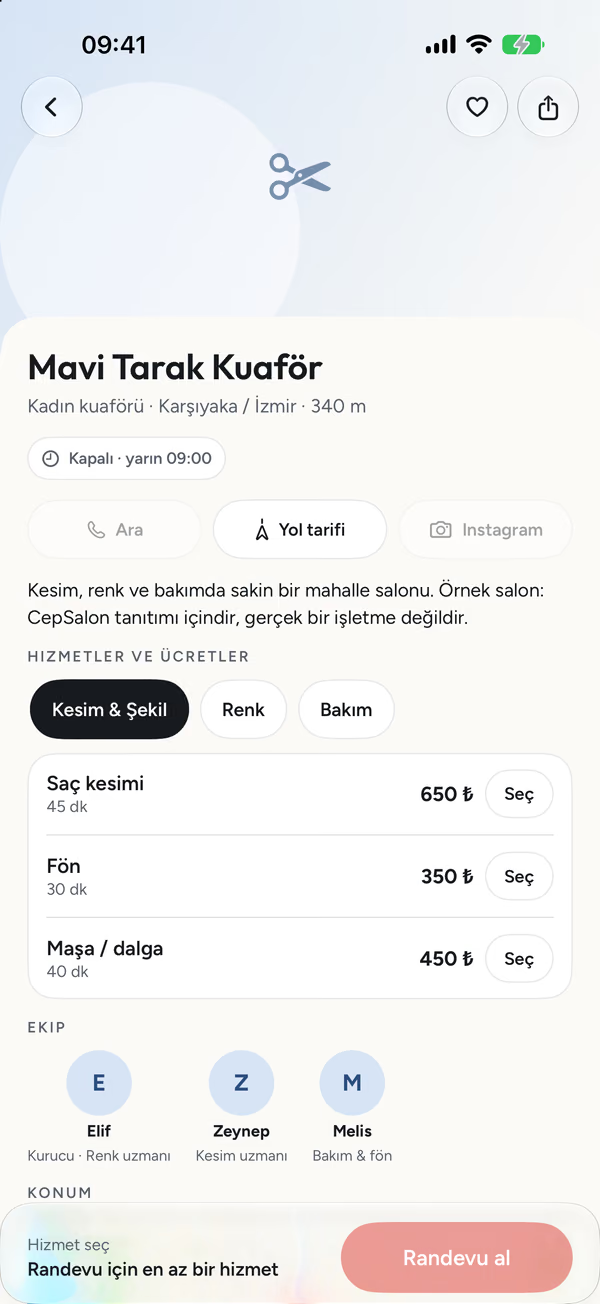
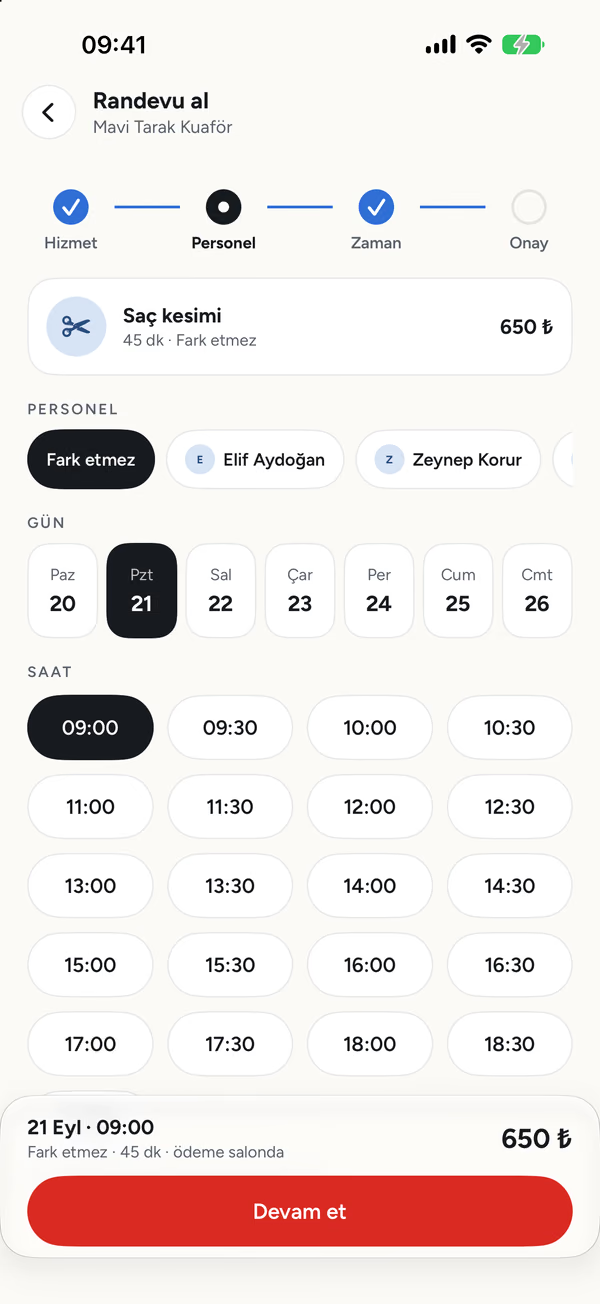
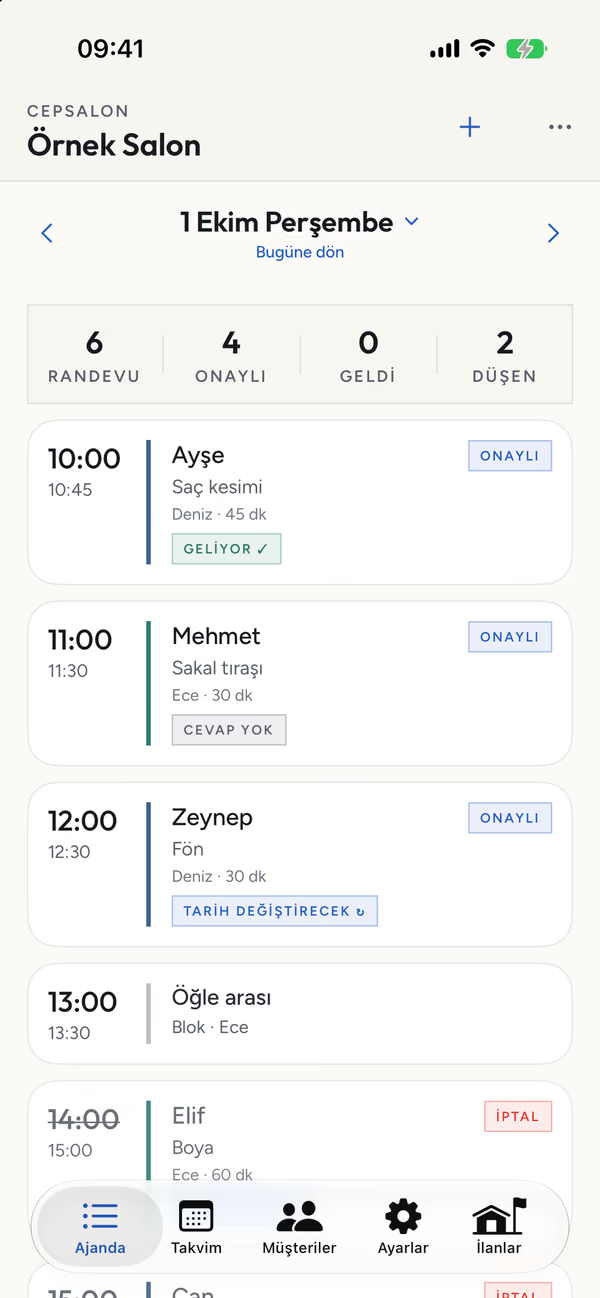
What we actually built
Native Swift + SwiftUI
The iPhone app and the Apple Watch app in a single project, including a watch-face complication showing the next appointment.Push notifications (APNs)
New bookings and cancellations land instantly. For privacy compliance the notification carries no phone number, email or customer note — only time, service and an abbreviated name.Row-level security
The database, not the client, decides which business sees which record. Even if the app asks for "my salon", the database enforces its own rule.One source of truth for rules
Conflict checks, email and calendar-file generation stay in a single web service and were never copied into the app. Logic that drifts apart in two places is the most expensive kind of bug.From TestFlight to the store
Beta distribution on real devices first, then store review — privacy labels, encryption declaration and a reviewer account included.No download required for the customer
Customers can book straight from the browser; installing the app is optional. We never make anyone "install our app first" — nothing kills conversion faster.
The customer screens come from the App Store listing, the business screens from the app running on sample data; salon names and personal details are for illustration and do not belong to real people or businesses.
Technology
Native or a single codebase?
Native (Swift / Kotlin)
When the app reaches into system capabilities — Apple Watch, widgets, camera and barcode scanning, background location, live activities — or when one platform needs the best possible feel.
- Full access to every device capability
- The smoothest animation and the most native feel
- Each platform is built separately → longer timeline, higher budget
Single codebase (React Native / Expo)
When you want to launch on iOS and Android at once, the app is mostly lists, forms and screens, and budget and timeline are the deciding factors.
- iOS and Android ship together
- Noticeably shorter timeline and lower budget
- Very specific system capabilities can add extra work
The tools we use
- Swift
- SwiftUI
- watchOS
- React Native
- Expo
- TypeScript
- PostgreSQL
- Row-level security (RLS)
- Edge Functions
- APNs
- FCM
- TestFlight
- App Store Connect
- Google Play Console
Infrastructure
The invisible half of an app
Data & authorization
On PostgreSQL, with record ownership defined at the database level. Servers are in the European Union (Frankfurt).Web admin panel
Where you manage content, users, prices and settings. Written by the same team as the app, so you're never caught between two vendors.Notification infrastructure
APNs for iOS and FCM for Android through a single path — instant alerts as well as scheduled reminders.The pages stores require
Privacy policy, data-protection notice, and account deletion both in-app and on the web. Without these, the stores won't publish the app.
Process
From idea to launch: 6 steps
- 01
Discovery & scope
We write down who opens the app, at what moment, to solve which problem. Scope is trimmed here; the most expensive feature is the one added later.
OutputScope & screen list
- 02
Flow & design
Screens and the transitions between them. We don't start coding until you've approved a clickable design.
OutputClickable design
- 03
Development
Two-week rounds. Every round ends with a build you can install on your phone.
OutputWorking build
- 04
Testing on real devices
TestFlight on iOS, closed testing on Android — on your team's actual phones. Notifications, permissions and real data get exercised here.
OutputBeta distribution
- 05
Store release
Account, icon, store artwork, listing copy, privacy labels, age rating and the review correspondence. If it's rejected, we write the response.
OutputA published app
- 06
Maintenance & releases
OS updates, store policy changes, bug fixes and new feature rounds. An app isn't finished on launch day.
OutputRelease plan
Store realities
What gets apps rejected?
In-app account deletion
Apple requires that any app with accounts lets the user delete theirs from inside the app. We don't hunt for an exemption because an admin created the account — the flow ships in v1.Web-based account deletion
Google Play additionally requires a deletion page reachable from a browser, outside the app. We add it to your website.Moderation when there's user content
If users can send each other messages or content, Apple looks for four things at once: reporting, blocking, moderation and a visible contact address.Closed testing on new Play accounts
New individual developer accounts must run an uninterrupted closed test with a set number of testers before applying for production. That's why the Play account is opened on day one, not at the end.Current target API level (Android)
Play requires new apps to target a current API level, and that bar rises every year. We build against the current level from the first compile.Privacy labels & data safety form
What you collect, who you share it with and why. The store form and your privacy policy have to agree — when they don't, the app comes back.Age rating
If the questionnaire doesn't match the content, the app is rejected. Especially critical for games and anything with chat — AI-generated content is assessed separately.Encryption declaration
Marking the declaration correctly for ordinary HTTPS speeds up review and stops the same question from reappearing on every release.
These items are accurate as of 24 August 2026. Apple and Google revise their policies several times a year; we check the current version together at the start of your project.
Quote
What's in the quote?
ItemIncluded
- Product flow and screen design
- iOS and/or Android app
- Database, authorization and API
- Web admin panel
- Push notification infrastructure
- App icon and store artwork
- Store listing copy and keywords
- Privacy policy, data notice and account deletion flow
- Store submission and review correspondence
- Post-launch maintenance plan
- Handover of the source code and store account to you
Thank you · labyra.co
Sectors
Who do we build for?
- Salons & beauty
- Clinics & health
- Cafes & restaurants
- Retail stores
- Wholesale & dealer networks
- Courses & education
- Gyms & studios
- Logistics & couriers
- Real estate
- Events & ticketing
- Manufacturing & field teams
- Founders with a game idea
Mobile apps are quoted per project
Screen count, platform (iOS / Android / both) and the need for notifications and a panel set the budget. We nail down the scope together and give a fixed-price quote. Store account fees (Apple annual, Google one-time) belong to you directly and are itemised separately.
FAQ
Frequently asked
How long until my app is live?
iOS or Android first?
Whose name is the store account in?
Do you really make games too?
Do I own the source code?
Does the app need a server?
What happens after launch?
I already have a system — can the app connect to it?
Last word
Tell us about the app you have in mind
A business app or a game — tell us the idea and we'll write back a clear scope, timeline and budget. If we think the idea doesn't warrant an app, we'll say that too.